
Claude Opus 5.5 came out on September 22, 2026. Within a week people had used it to build Fallout in New York, a Mario Kart clone with eight racers, Pokémon Red drawn in raw pixels and a Minecraft with real-time shaders. Many of them shared the exact prompt.
We collected 100 of those games and their prompts and checked each prompt against the creator’s own post or repository. This guide picks the 20 that teach the most, explains why each prompt worked, and gives you the prompt word for word.
The short version
- Short prompts made the most-viewed games. An eight-word Fallout prompt reached 3.6M views. Opus fills in the design when you leave room.
- Remake prompts work because the model knows the game. The best ones add a twist or a hard constraint.
- Long briefs win on polish. They name the engine, the controls, the look and, above all, how the game will be tested.
- “One self-contained HTML file” is the most reliable phrase in the whole collection.
1. One-line prompts that went viral
The most-watched games in the collection came from the shortest prompts. With almost nothing to go on, Opus 5.5 chooses the setting, the systems and the art direction itself. That is a risk, but when the idea is clear and well known, the model’s own choices are often better than a long list of instructions.
Fallout: New York
Eight words, and the model delivered quests, dialogue trees, V.A.T.S. targeting and a working Pip-Boy. Chris First says there is not one texture or sound file: every building, weapon, face and sound is generated in code. The prompt works because “Fallout” carries a huge, well-documented design, and “New York” gives it a fresh map to build.
make me a Fallout game in New York
Steal this: Name a famous game plus one new setting. The game supplies the rules; the setting makes it yours.
Aeroplane simulator
Six words and close to a million views. Karan ran the same short pattern for a 3D shooting game too (700K views). Short prompts like this are the fastest way to see what Opus 5.5 can do before you invest in a long brief.
build me an Aeroplane Simulator game
Steal this: “build me a [genre] game” is a fair first test. Spend your effort on the follow-ups, not the first prompt.
Two walkable Indian cities
Shardul left this one running overnight and woke up to Mumbai’s Western line and Bengaluru’s purple metro, each on its own tiny planet with NPCs. A concrete, personal request (“cities I can walk around”) gives the model a clear goal to plan against during a long run.
build me two Indian cities I can walk around
Steal this: Ask for something you can walk around in. A verb (“walk”, “drive”, “fly”) tells the model what the controls should be.
Genshin-style RPG set in San Francisco
One sentence in a famous style plus a funny setting. Claude came up with the jokes itself: $4,200 rent, a sourdough sword and a special move called “Series Z”, in which the hero raises $40 million. Pairing a genre with an unexpected place is a reliable way to get personality, not just mechanics.
Build a Genshin Impact–style game set in San Francisco.
Steal this: Put a serious genre in a silly or specific place, and the model will write the jokes for you.
2. Remake prompts: classics rebuilt
“Recreate X” prompts work because the model already knows the original in detail: the levels, the items, the rules. The best ones add one twist or one hard limit, so you get something new instead of a weak copy.
The Minecraft test
Noah Wachnik called this “the Minecraft test”. The second sentence is the trick: asking for advanced shaders pushes the model past a basic voxel demo to lighting, water and atmosphere. Another creator later used the same opening with a long technical spec, which is a useful comparison.
Create a playable version of Minecraft in my browser. Add advanced shaders that make it look as real and beautiful as possible.
Steal this: Add one quality bar to a remake (“advanced shaders”, “as real as possible”). It changes the whole result.
Pokémon Red remake in pure pixels
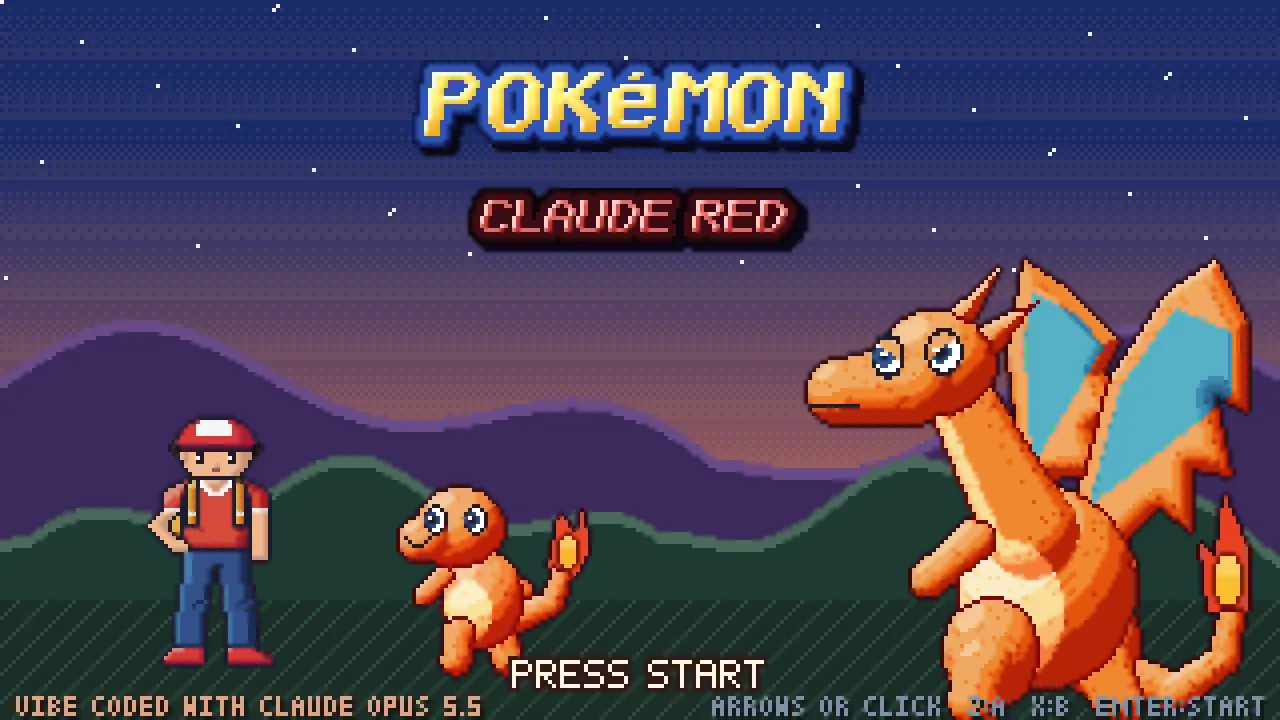
The constraint does the work here. “Using only pixels directly” means no image files at all, so every sprite, tile and song is drawn or played by code. The prompt also tells the model to research the original dialogue on the web, so the story stays faithful.
using only pixels directly remake a beautiful pokemon red remake but with better graphics, environments and vfx. visualise everything perfectly as pixel art using raw pixels. absolute pixel art perfection. keep the story exactly as pokemon red (research on web for all dialogue etc)
Steal this: Tell the model to research the original before it builds. Faithful details are what make a remake feel right.
Open the listing: video, prompt and SKILL.md download → · Play the original ↗
Marble Madness remake in 3D
Ten words: analyze the old game and write a better one. The result has six floating courses, real marble physics, pistons, acid pools and a final gauntlet. “Analyze, then improve” gives the model a clear two-step plan.
analyze this old 2D version and write a better one
Steal this: Give the model the original to study, then ask it to improve on it.
Open the listing: video, prompt and SKILL.md download → · Play the original ↗
Guinea-pig Mario 1-1
A Japanese creator asked for Mario 1-1 with a guinea pig as the hero and original enemies, and got it in five minutes. Swapping the hero and the enemies keeps a famous, proven level design while avoiding a straight copy.
マリオ1-1でプレイヤをモルモットにして敵もオリジナルに変えて
English translation: Take Mario 1-1, make the player a guinea pig, and replace the enemies with original ones.
Steal this: Keep the level design, swap the characters. You get a proven game that is still yours.
3. “No questions asked”: long unattended runs
Some of the most complete games came from prompts that tell Opus to make every decision itself and keep working. These runs can take hours and use a lot of your plan, so they suit a big idea you will not be supervising.
Turbo Kart GP: Mario Kart-style racer
This prompt sets up a team: five sub-agents, Three.js, “triple A quality”, and no questions at all. The result has 4 tracks, 8 racers, 9 items, drifting, AI rivals, a Grand Prix and trophies. The creator reports about five hours and around $125 of usage.
I need you to launch five(Model) sub-agents and help me build a triple A quality game that is a clone of Mario Kart. What I want you to do is I want you to launch these sub-agents, build the game without asking me any questions at all, and use 3JS to build the game. And once you're done, report back to me.
Steal this: “Launch N sub-agents” plus “don’t ask me any questions” is the pattern for a big game in one go. Check your usage limits first.
Open the listing: video, prompt and SKILL.md download → · Play the original ↗
Call of Duty: Zombies clone in Three.js
“No questions asked” is doing real work. Claude committed to a design and wrote about 13,000 lines of Three.js: zombies tear boards off windows, plus the Mystery Box, Pack-a-Punch, Juggernog, the Ray Gun and round maths taken from Black Ops 1.
build me Call of Duty: Zombies, no questions asked.
Steal this: If you want a finished game, not a plan, end the prompt with “no questions asked”.
PUBG-style battle royale
“The highest-quality playable PUBG you can” sets the bar instead of the features. Emmanuel ran it overnight against another model; Opus worked for about ten hours and produced a fully playable game.
Build the highest-quality playable PUBG you can.
Steal this: Ask for “the highest-quality version you can” and let the model decide what quality means for that genre.
4. Full design briefs for polished games
Long prompts trade surprise for control. They specify the engine, the controls, the camera, the art style, the levels and how the game will be checked. If you have a clear picture of the game you want, this is the shape to copy.
Rocket League-style car football
A structured brief with sections for the goal, tech, physics, controls and the definition of done. One line worth stealing: “The first screen should be the actual game, not a landing page.” Without it, models often build a menu and a splash screen first.
Build a polished browser-based 3D Rocket League-style game using Three.js.
Goal: Create a fully playable local web game that runs in the browser. The first screen should be the actual game, not a landing page.
Tech requirements:
Use Three.js for rendering.
Use a real physics engine, preferably Rapier.js, for car, ball, arena, wall, and goal physics.

Use TypeScript if the project already supports it, otherwise plain modern JavaScript is fine.
Use Vite for the dev server unless another stack already exists.
Keep the architecture clean: separate rendering, physics, controls, game state, UI/HUD, and assets.
Core gameplay:
Third-person controllable rocket car.

Large soccer ball with believable bouncy physics.

Enclosed arena with side walls, back walls, ceiling or high invisible bounds, and two goals.
Score detection when the ball crosses fully into a goal.
Reset after each goal with a countdown.
Match timer and score display.
Boost system:Boost meter from 0-100.
Hold boost key to accelerate with flame/trail effect.
Boost drains while active.
Boost pads around the arena refill boost.

Jump system:Single jump.
Optional second jump / flip if feasible.
Air control with pitch, yaw, and roll.

Car should feel responsive and arcade-like, not like a slow simulator.
Controls:
WASD or arrow keys: drive / steer.
Space: jump.
Shift: boost.
R: reset car.
C: toggle camera mode.
Esc or P: pause.
Camera:
Smooth chase camera behind the car.

Camera should follow car rotation and velocity while remaining readable.

Optional ball-cam toggle that keeps the ball in view.
Visual design:
Recreate a Rocket League-inspired feel, including branded-style presentation if desired.
Add a futuristic indoor stadium, colored goals, boost pads, arena trim, and energetic UI.
Add lighting, shadows, bloom or subtle postprocessing if performance allows.
Add clear team colors, goal colors, boost pad glow, trail effects, ball highlight, and simple particle effects.

Use generated, procedural, or available assets as appropriate.

Add a readable HUD with score, timer, boost meter, countdown, and goal celebration text.
Ensure the game works on common laptop screens and resizes correctly.
Physics feel:

Prioritize fun over realism.

The ball should be heavy but responsive.
Cars should have strong acceleration, drift-friendly turning, and stable recovery.
Avoid cars flipping uncontrollably from minor bumps.
Tune gravity, friction, restitution, angular damping, and impulses until gameplay feels good.
AI / opponent:
If time permits, add a simple bot opponent:Bot chases the ball.
Bot aims roughly toward the player goal.
Bot can boost occasionally.
Bot should be beatable, not perfect.

If bot is too risky, create a solo practice mode with two goals and a working scoreboard.

Implementation expectations:

Build the complete working game, not just a prototype shell.
Include all source files.
Add brief comments only where the logic is non-obvious.
Avoid overengineering.
Do not create a marketing homepage.

Verification:

Start the dev server.
Test the game in the browser.
Verify:The scene renders.
The car moves, turns, jumps, and boosts.
The ball collides with the car and arena.
Goals are detected correctly.
Score and timer update.
Reset after goal works.
Boost pads refill boost.
The camera does not clip badly or lose the car.
No major console errors.

Take at least one screenshot or use browser automation to confirm the canvas is nonblank.
Deliverable:
A local runnable browser game.

Provide the dev server URL.

Summarize controls and what was implemented.
Quality bar: Make it feel like an arcade sports game people would actually want to play for five minutes. Spend extra effort tuning car handling, camera smoothing, ball impact, boost feel, and goal feedback. A technically complete but boring physics demo is not acceptable.

A few more bits of feedback. I would like for you to test the game and work back and forth until you have a very strong match to the original Rocket League, including the car design for the Octane. It all should look nearly identical to the original. We are not going to sell or reproduce this. It's just for a visual test, so it is okay to make it look the same, as it will never be distributed.

I want there to be infinite boosts by pressing B, and I want the UI to look extremely polished, like a real game. Make sure that the actual map also looks like Champions Field and is a strong match for the original and very polished. It should look very good. The lighting and the gameplay should be true to life. The physics should feel correct according to the original game. Everything should work exactly the same as it did, from the flip resets to the tackles, to the goal explosions, to the smoke behind the ball when it goes fast, to all of the little small details that generally get missed. I really want you to pay attention to the details.

I really want you to work in a loop and make sure that you are really comparing it to the original game, and I want you to keep iterating until the assets in the game look legitimate and real. You have as many tokens as you want to complete this task. I'm not in a rush at all. I think I just want it to look and play as best as possible. So iterate and take your time.

You have as many tokens as you want to complete this task. I'm not in a rush at all. I think I just want it to look and play as best as possible. So iterate and take your time.

Use every available asset that you can find to improve the quality of your work. Leave no stone unturned. You literally can work for as long as you want and build something truly exceptional.
Scroll the box for the full 5,635-character prompt, or use Copy prompt.
Steal this: Write “the first screen should be the actual game”. It stops the model spending its effort on menus.
Far Cry 3-style tropical lagoon
Max built this with a $20 plan and no coding or 3D skills; he says it used about 15% of his weekly quota. The brief spends most of its words on atmosphere: light, water, sound and the feeling of standing alone on an island. That is why the result looks the way it does.
Create a visually stunning, highly atmospheric, interactive first-person 3D game set in a small tropical lagoon with a jungle survival outpost.
The game should capture the feeling of standing alone on a beautiful tropical island, similar in atmosphere and environmental design to Far Cry 3, with modern graphics, cinematic lighting, advanced shaders, and detailed environmental interactions.
I WILL PROVIDE REFERENCE IMAGES. Use the uploaded images as the primary visual references for the environment, composition, color palette, vegetation, outpost design, lighting, and overall atmosphere. Recreate the visual mood and environmental character of the references as closely as possible.
The result should be a playable, polished first-person experience, not a static scene or a simple tech demo.
1. WORLD AND ENVIRONMENT
Build a SMALL but extremely detailed tropical lagoon.
Do not create a massive open world. Prioritize visual fidelity, environmental density, atmospheric quality, and interactivity over map size.
The scene must include:

A beautiful tropical beach with sand, small rocks, driftwood, and scattered vegetation.
A stunning turquoise ocean with realistic waves and water transparency.
Shallow coastal water transitioning naturally into deeper blue water.
Dense tropical jungle surrounding the lagoon.
Palm trees, tropical bushes, vines, ferns, tall grass, and exotic plants.
Large moss-covered rocks and weathered coastal cliffs.
A small survival outpost located directly beside the beach, partially surrounded by jungle.
Natural pathways connecting the beach, outpost, and jungle.
Small environmental details that make the location feel authentic and lived-in.
The lagoon should feel isolated, peaceful, mysterious, and slightly dangerous.
The environmental aesthetic should be strongly inspired by Far Cry 3's tropical island atmosphere, but with the graphical quality and lighting of a modern high-end game.
2. THE OUTPOST
Create a small jungle survival outpost, NOT a large military base.
It should resemble a tiny improvised shelter, wooden shack, or canvas tent built by someone surviving on a tropical island.
The outpost should feel handmade, worn, and realistic.
Include:

A small improvised wooden shelter or tent.
A simple wooden table.
A small sleeping cot or military-style bed.
An AK-47 lying somewhere inside the outpost.
A survival knife resting on the table or near the bed.
Animal skins and hides hanging from the shelter or lying on the furniture.
A wooden supply crate that can be opened.
Small storage containers.
Old backpacks and survival equipment.
Ropes, fabric, wooden planks, and improvised construction elements.
Subtle environmental storytelling through scattered personal belongings.
Everything should feel physically placed in the environment rather than randomly generated.
Make the shelter visually interesting through layered materials, shadows, ambient occlusion, fabric simulation, and carefully placed props.
3. FIRST-PERSON CHARACTER
The player controls a character from a FIRST-PERSON perspective.
The player's hands and forearms MUST be visible.
Create high-quality first-person animations:

Idle breathing.
Natural hand movement.
Walking and running animations.
Looking around.
Picking up objects.
Holding a weapon.
Throwing stones.
Using a knife.
Interacting with the environment.
The camera should have subtle, natural movement.
Avoid excessive camera shaking.
Hands must feel connected to the player's actions. They should not look like floating objects or static models.
4. STONE THROWING MECHANIC
One of the most important features is the ability to pick up and throw small stones into the ocean.
The player should be able to:

Look at a small stone on the beach.
Pick it up.
See the stone in their hand.
Aim toward the ocean.
Throw the stone using a natural first-person animation.
The stone must have realistic projectile physics.
When the stone hits the ocean, create:

A visible water splash.
Expanding circular ripples.
Small water droplets.
Appropriate splash sound.
Realistic interaction between the projectile and water surface.
Stone throwing should feel satisfying and physically believable.
Allow the player to throw multiple stones without restarting the game.
5. AK-47 INTERACTION
Place an AK-47 inside the outpost.
The player must be able to approach the weapon and pick it up.
When equipped:

Display the AK-47 in a proper first-person weapon position.
Show both hands holding the weapon.
Implement realistic weapon sway.
Implement a shooting animation.
Add muzzle flash.
Add recoil.
Add shell casing ejection.
Add realistic gunshot audio.
Add environmental bullet impacts.
Add an optional reload animation.
The player should be able to shoot at rocks, trees, wooden objects, and other environmental surfaces.
Bullets should create appropriate visual and audio effects depending on the material they hit.
There is no need to create enemy AI or a combat campaign. Focus on making the weapon interaction feel polished and satisfying.
6. KNIFE INTERACTION
Create an interactive survival knife inside the shelter.
The player can pick it up and equip it.
Implement:

First-person knife holding animation.
Idle knife animation.
Knife swing animation.
Slash animation.
Appropriate sound effects.
Natural hand and wrist movement.
The knife should feel like a proper usable first-person tool, not a static object attached to the camera.
7. INTERACTIVE OBJECTS
Make the environment feel alive and interactive.
The player should be able to interact with selected objects.
Important interactions include:
Supply crate
The player can approach a wooden crate, interact with it, and open its lid.
The lid should animate naturally.
Plants
The player can approach specific tropical plants and harvest them.
Create a small first-person harvesting animation.
After harvesting, the plant should disappear from its original location or visibly lose its harvested part.
The collected plant must be added to the player's inventory.
Inventory
Create a simple but visually polished inventory interface.
Collected plants and other pickup items should appear in the inventory with their name, icon, and quantity.
The inventory must actually work and retain collected items during gameplay.
Other objects
Allow selected small objects around the outpost to be picked up or examined when appropriate.
Use subtle interaction prompts rather than oversized UI elements.
8. WEATHER SYSTEM
Implement a functional dynamic weather system.
The player should be able to switch between:

Clear tropical weather.
Cloudy weather.
Tropical rain.
Heavy tropical rain.
Rain must affect the entire environment visually.
When rain begins:

Rain particles appear.
Rain hits the ocean and creates small surface disturbances.
Sand and rocks become darker.
Leaves and wooden surfaces become wet.
Wet materials become more reflective.
Puddles appear where appropriate.
Atmospheric fog increases.
Rain audio becomes audible.
Ocean and jungle ambience change naturally.
Use wetness shaders and physically based material transitions.
The rain should feel like an actual tropical storm, not simply particles falling in front of the camera.
9. TIME OF DAY SYSTEM
Add a dynamic time-of-day system.
Allow the player to switch between:

Early morning.
Bright tropical noon.
Golden hour / sunset.
Night.
Each time of day must produce a noticeably different visual atmosphere.
Morning should include soft lighting and atmospheric mist.
Noon should feature strong tropical sunlight, vibrant turquoise water, and deep jungle shadows.
Sunset should have warm orange light, beautiful reflections on the ocean, and cinematic shadows.
Night should have moonlight, dark jungle silhouettes, subtle ambient lighting, and a peaceful tropical atmosphere.
Weather and time of day must work together.
For example, the player should be able to experience heavy rain at sunset or a cloudy nighttime lagoon.
10. GRAPHICS AND SHADERS — EXTREMELY IMPORTANT
VISUAL QUALITY IS ONE OF THE MAIN PRIORITIES.
Make the game look like a modern, high-quality tropical exploration game.
Use as many appropriate advanced graphical techniques as possible while maintaining playable performance.
Prioritize:

Physically Based Rendering (PBR).
Realistic water shaders.
Water refraction.
Screen-space or equivalent reflections.
Realistic ocean foam.
Shoreline water interaction.
Subsurface scattering for vegetation.
Detailed foliage shaders.
Wind-driven vegetation animation.
Soft dynamic shadows.
High-quality ambient occlusion.
Cinematic global illumination where supported.
Volumetric lighting.
Atmospheric fog.
Sun shafts passing through palm leaves.
Realistic wetness shaders.
Beautiful sky and cloud rendering.
High-quality tone mapping and color grading.
Subtle bloom.
Natural exposure adaptation.
High-quality material textures.
Realistic surface roughness and normal mapping.
Make the ocean and vegetation particularly impressive.
The water should look mesmerizing, with vibrant tropical colors, natural wave movement, and beautiful sunlight reflections.
Leaves and palm trees should move naturally in the wind.
The jungle must feel lush, dense, and visually rich.
Avoid flat lighting, generic low-poly graphics, cartoon-like materials, and empty environments.
Do not sacrifice the entire frame rate just to enable expensive effects. Use optimized techniques appropriate for the chosen engine.
11. SOUND DESIGN
Create immersive tropical environmental audio.
Include:

Ocean waves.
Water moving along the shoreline.
Wind passing through palm leaves.
Jungle birds.
Tropical insects.
Distant wildlife.
Footsteps on sand.
Footsteps on wood.
Stone throwing and water splashes.
Weapon handling.
AK-47 gunshots.
Knife swings.
Crate opening.
Rain hitting leaves, sand, wood, and water.
Use spatial audio and environmental sound variations where possible.
The lagoon should feel alive even when the player does nothing.
12. CONTROLS
Implement intuitive first-person controls.
WASD — Move.
Mouse — Look around.
Shift — Sprint.
Space — Jump.
E — Interact / pick up objects.
Left Mouse Button — Shoot, swing knife, or throw a held stone.
R — Reload the AK-47.
1 — Equip AK-47.
2 — Equip knife.
3 — Equip stone, if available.
I — Open inventory.
T — Change weather.
N — Change time of day.
ESC — Pause / settings.
Provide a small, elegant interface for changing weather and time of day.
Do not clutter the screen with unnecessary HUD elements.
13. VISUAL ATMOSPHERE AND ART DIRECTION
The entire experience should capture this feeling:
You are alone in a hidden tropical lagoon.
The ocean is crystal clear.
The jungle is dense and full of life.
A small improvised shelter stands beside the beach.
Your AK-47 rests near your sleeping cot.
A knife and survival equipment lie on the wooden table.
Animal skins hang from the structure.
Sunlight passes through palm trees and reflects from the ocean.
You can pick up a stone and throw it into the sea, watching the splash and ripples disappear into the waves.
You can explore the shelter, pick up your weapon, examine objects, gather tropical plants, and watch the weather change.
The scene should be beautiful enough that the player wants to stand still and admire the environment.
The visual identity should combine:
Far Cry 3 tropical island atmosphere + modern cinematic graphics + realistic water rendering + dense, detailed jungle + immersive first-person interactions.
14. IMPORTANT DEVELOPMENT REQUIREMENTS
This must be a WORKING, PLAYABLE EXPERIENCE.
Do not simply create a beautiful static 3D render.
Implement the actual gameplay systems described above.
Prioritize a small, complete, polished environment rather than a large unfinished game.
All important mechanics should work:

First-person movement.
Visible animated hands.
Pickable and throwable stones.
Functional water splash effects.
Equippable and shootable AK-47.
Equippable and usable knife.
Opening supply crates.
Harvesting plants.
Functional inventory.
Dynamic rain.
Dynamic time of day.
Advanced environmental shaders.
Do not replace the requested systems with decorative placeholders.
If development limitations require prioritization, complete the core mechanics first, then add graphical polish.
15. REFERENCE IMAGES
I WILL UPLOAD REFERENCE IMAGES AFTER THIS PROMPT.
These images are extremely important.
Analyze them carefully and use them as the main visual guide.
Pay particular attention to:

Lagoon shape and composition.
Position of the ocean relative to the beach.
Tropical vegetation density.
Structure and scale of the outpost.
Color palette.
Lighting.
Water appearance.
Atmosphere.
Environmental details.
The final game should feel like a playable recreation of the location and mood shown in my reference images.
Do not blindly generate a generic tropical island.
Use the references to create a distinctive, carefully art-directed, immersive lagoon environment.
Scroll the box for the full 12,875-character prompt, or use Copy prompt.
Steal this: Describe the feeling you want the player to have, not just the features. The model designs towards it.
Feudal Japan riverboat journey
Meng To’s brief describes a whole scene: a wooden riverboat poled upstream through a mountain valley in cherry-blossom season, with weather, day and night lighting and 3D characters. It asks for “cinematic and painterly rather than photorealistic”, which gives the model a clear art direction.
Create from scratch a fully interactive 3D scene of a traditional wooden riverboat being poled upstream through a mountain river valley in feudal Japan during cherry-blossom season. The visual style should be cinematic and painterly rather than photorealistic, while still being exceptionally rich, detailed, polished, and visually sophisticated.

Build the valley terrain, river, riverbanks, rocks, cherry trees, maples, pines, forest, ground cover, temple architecture, boat, boatman, villagers, sky, clouds, distant mountains, lighting, materials, water, reflections, petals, mist, particles, wildlife, weather, a full day-and-night cycle, sound, animation, camera work, composition, atmospheric depth, and color grading. The final result should feel like a premium, high-production 3D artwork, not a prototype, technical demo, or low-quality scene.

Start from a completely blank page. Do not reuse or depend on any previous project or scene. You may create the assets yourself or use reliable, trusted, open-source assets and libraries when necessary.

Mandatory requirements:

No text of any kind may appear anywhere inside the scene, including the loading screen. No titles, names, logos, descriptions, credits, labels, or control instructions in any language. Any loading indicator must be purely graphic.

Deliver the entire project as one final standalone page file that can be opened directly in a web browser, with assets embedded inside it as much as reasonably possible and no runtime requests to external CDNs.

The valley must feel like one continuous, believable place. A winding river flows down a long valley that narrows into a gorge upstream. It has a deep channel and shallow pebbled margins. Its banks vary between gravel bars and steeper earthen banks. Forested valley walls rise into rounded mountains, and far ranges fade layer by layer into haze.

Build these landmarks along the river:
- An arched vermilion wooden bridge on piers that stand in the water.
- A torii gate at the bridge's end.
- A path to stone steps and a temple terrace held up by dry-stone retaining walls.
- A main hall with a curved tile hip-and-gable roof, upturned corners, bracket sets, a railed veranda, and lattice doors.
- A five-storey pagoda with a ringed spire on a knoll.
- Stone lanterns along the approach.
- A small wayside shrine in a clearing on the far bank.
- A tunnel of small vermilion torii climbing the bank upstream to a hillside shrine.
- A rope fence with paper streamers.
- Bells hanging from the roof corners that swing in the wind.

For vegetation, place hero cherry trees by hand, including a weeping cherry. Give them gnarled, leaning trunks, let some overhang the water, and cover them in dense blossom. Add Japanese maples, cloud-pruned pines, and a dense mixed forest of cedars and broadleaf crowns on the slopes. Cover the ground with wind-blown grass, reeds, spring wildflowers, ferns, clipped azalea shrubs, mossy boulders, and exposed roots at the water's edge. All foliage must move in one shared, gusting wind, and the blossoms must glow when backlit.

The hero boat is a takasebune-style river cargo boat. It needs a planked hull with real thickness, ribs, thwarts, floorboards, and iron clamps. Give it a reed-mat canopy on bamboo hoops, a cargo of rice bales, crates, and a glazed jar, plus coiled rope, a bow lantern on an arching bamboo pole, and a sculling oar stowed at the stern quarter.

A boatman in a straw cape stands on a raised bow platform and poles the boat with a long bamboo pole, using his whole body: hips drop, the spine leans into the push, the feet stay planted, and both hands grip the pole firmly. The cape reacts to the wind and to each stroke. The pole must never pass through the hull, the hands, or anything else.

Add two villagers. A woman under a red oiled-paper umbrella stands at the bridge rail watching the boats. An old monk sweeps petals off the temple approach. Both breathe and move subtly.

The water must be the centrepiece. It needs:
- Accurate reflections of everything above it.
- Refraction and depth-based color absorption, with the pebbled riverbed visible in the shallows.
- Ripples that follow the flow.
- Faster water and white foam collars around boulders and bridge piers, with foam trailing downstream.
- A convincing wake that follows the boat: a bow wave, V-shaped arms, and a disturbed band along the hull.
- Rafts of petals drifting in the slack water along the banks.

Fill the valley with life and particles:
- Petals tumble from each cherry canopy and through the air.
- Petals ride the current downstream and settle on the banks, the steps, and the bridge deck.
- Dust motes glow only inside the sunbeams.
- Banks of low river mist drift over the water.
- Flocks of birds wheel over the valley, and a pair of herons sometimes crosses the river ahead of the boat.
- Fireflies come out at dusk.

Run a continuous day-and-night cycle of several minutes that loops: dawn, morning, afternoon, a thunderstorm, golden hour, sunset, blue hour, moonlit night, pre-dawn. The sun travels a real arc, the moon takes over as the key light at night, and shadows follow whichever one is lit. Sky color, clouds with silver-gold linings, fog, ambient light, exposure, and the color grade all change with the hour. At night, show stars, a faint Milky Way band, and a cratered moon.

The afternoon storm thickens the clouds into a dark overcast. It brings rain streaks, splash crowns on the river, and branching lightning that lights the clouds and the whole valley. Surfaces turn wet and glossy, then dry slowly through sunset.

After dusk:
- The stone lanterns and the hall's doors glow.
- Paper lanterns set adrift on the river (tōrō nagashi) flow past and part around the boat.
- Pale spirit wisps with comet-like trails drift above the water. Each one lights the water, mist, and banks around it and appears in the reflections.

Golden hour is the signature look: a low warm sun up the valley, long shadows, god rays through the trees and mist, backlit blossoms, and a warm haze.

Add a quiet synthesized soundscape of flowing river, rain, and thunder that rolls in after each flash, with a keyboard toggle to mute it.

The boat must travel upstream on its own. An autopilot threads it between rocks and bridge piers without ever touching them. The viewer can take over with WASD or the arrow keys. Steering needs momentum, turning inertia, water drag, and a heel into turns. Banks, rocks, and piers push the boat back physically. After a short idle period, the autopilot resumes.

A third-person chase camera follows the boat with drag-to-orbit, scroll-to-zoom, and a slow cinematic drift. It must never dip below the banks or into tree canopies. Holding a key fast-forwards the time of day. When the boat reaches the head of the gorge, the scene fades into mist and restarts downstream, so the journey loops forever.

The water, boat, boatman, foliage, petals, and camera must all be animated naturally and smoothly. Avoid artificial slow motion or sluggish movement. The boat should feel like it is genuinely being pushed upstream against the current.

Do not rely on primitive geometric shapes as the finished result. The trees, architecture, boat, characters, and rocks need carefully shaped geometry and clearly visible small-scale details: bark, roof tiles, rafters, joinery, planking, rope lashings, and bamboo nodes. Use detailed, scanned, or high-quality textures for rock, bark, ground, stone walls, and wood. Everything must rest on the ground or the water. Nothing may float, and no objects may intersect.

Lighting must reveal the geometry and materials clearly at every hour. Use soft shadows, ambient occlusion in crevices and at roots, light shafts, bloom, and a filmic grade. Shadow sides must stay readable, never crushed to black.

Maintain a strong balance between visual quality and real-time performance, including on high-density (Retina) displays, preserving smooth interaction and animation without making an obvious sacrifice in quality.

Automatically use the most appropriate skills, tools, libraries, techniques, and available assets needed to achieve the best result. Do not wait for me to specify which technologies to use.

Actually test the finished result in a desktop web browser. Capture screenshots at morning, during the storm, at golden hour, and at night. Inspect the browser console for errors, and fix every visible or technical issue you find. That includes distorted geometry, black screens, failed asset loading, broken animation, poor composition, rendering artifacts, floating or intersecting objects, the boat or pole clipping through anything, and camera problems.

At the end, verify that the final file opens and works directly, that the scene contains no text whatsoever, and that there are no remaining runtime or loading errors. Then finish the task with only a brief response.
Scroll the box for the full 8,916-character prompt, or use Copy prompt.
Steal this: Name the art style with a contrast: “painterly rather than photorealistic”. It is clearer than a list of adjectives.
Bloomfall: overgrown ruin explorer
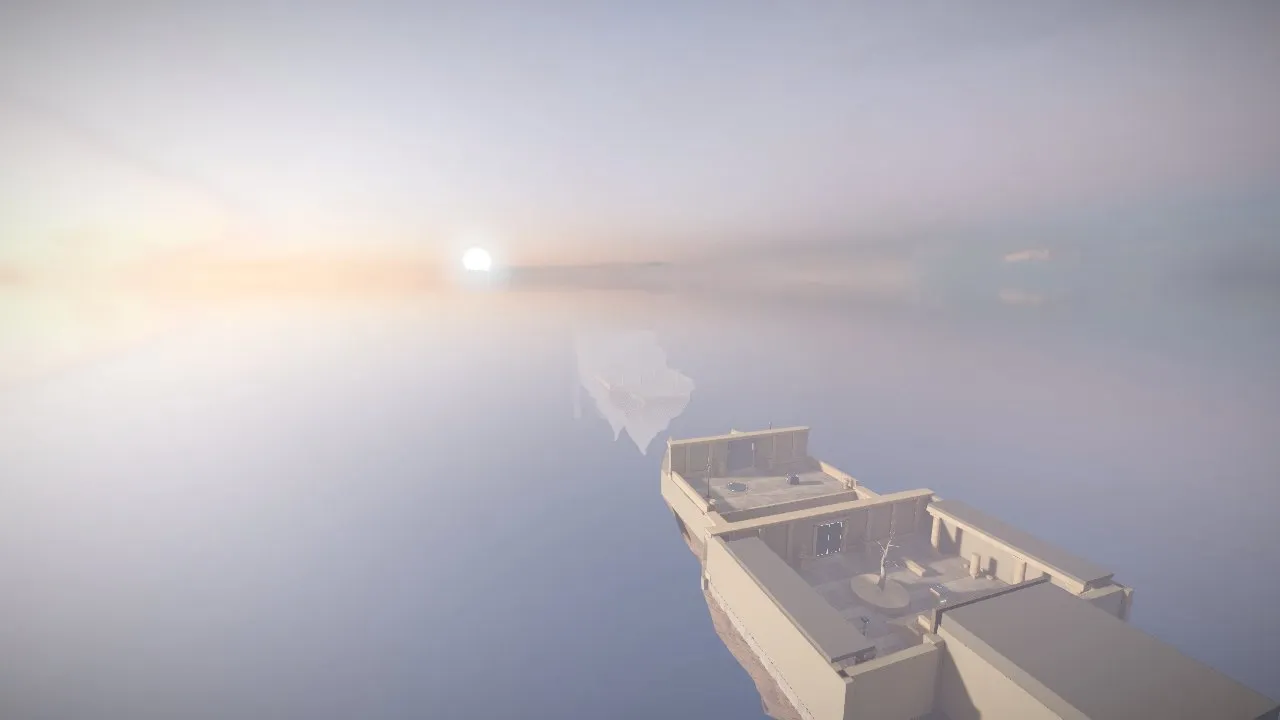
This brief ends with instructions every game prompt can use: play the game like a first-time player, take screenshots from ten places, list the weakest parts and fix them twice. Ethan Hann ran it on Opus 5.5 at Max effort.
You are an experienced game developer and technical artist. You are an expert at 3D game design and real-time graphics.

Your goal is a 3D game with the following idea:
Genre: Physics x Puzzle Platformer
Rule: Expanding World
Setting: Distant Future
Theme: Downfall

STANDING RULES:
1) The game must have a goal and an end state.
2) The game must have a small tutorial at the start that explains the mechanics.
3) There must be a feeling of progression.
4) Use Three.js for 3D rendering. Write the game as a TypeScript project built with Vite. The build must output one self-contained HTML file that runs offline. Commit that built file so the game can be played without building.
5) The graphics must look realistic, like a current indie game, not low poly. Aim for real materials, soft light, and atmosphere.
   - Every solid surface uses a full PBR texture set (color, normal, roughness) from CC0 sources such as Poly Haven and ambientCG. No flat colors except on glowing surfaces.
   - Use detailed models, or bevel the edges of simple shapes. Do not use stylized low-poly packs such as Kenney or Quaternius.
   - Light the world with an HDRI environment, soft shadows, ambient occlusion, and tone mapping.
   - Include a graphics quality setting.
6) Use Blender, scripted in Python, to build, clean up, and light the game's assets. Bake lighting into lightmaps for geometry that never moves. Anything that moves or changes uses real-time light and shadows. Commit the Blender scripts so every asset can be rebuilt.
7) You may use CC0 3D models, textures, HDRIs, and animations. Commit only the files the game uses. Keep the built HTML file under 50 MB.
8) Put the game in its own folder with a README.md that explains how to play, without spoilers. Add the game to the root README with this prompt, like the other entries.
9) If the world building is large, create a LORE.md file and a SPOILERS.md file. LORE.md contains world-building facts and screenshots. SPOILERS.md contains everything a new player should not know before playing.
10) No subagents and no workflows.

NOTES FROM A TEST RUN IN THIS ENVIRONMENT:
- Downloads work from npm, Poly Haven, ambientCG, Google Drive, jsDelivr, and raw.githubusercontent.com. Poly Haven (api.polyhaven.com) and ambientCG (ambientcg.com/api/v2/full_json) have JSON APIs that list download links. GitHub web pages and zip downloads are blocked, but git clone of a public repo works.
- `pip install bpy` installs Blender 5.0.1 as a Python module in about 20 seconds. It takes about 1 GB of disk and runs without a screen. Cycles baked two 512x512 lightmaps at 64 samples in about 9 seconds on the CPU. The glTF exporter wrote the lightmap UV map as TEXCOORD_1.
- Cycles bakes into the active UV map. Make the lightmap UV map active before baking, or the lightmap will not line up with its UVs.
- 8-bit PNG lightmaps clip bright light. In the test, 90% of a sunlit floor clipped to pure white. Baking into a float image and saving it as Radiance HDR fixed it. Each 512x512 HDR lightmap was 400 to 560 KB.
- In Three.js, load HDR lightmaps with HDRLoader, then set channel to 1 and flipY to false to match glTF UVs. With the default flipY, one face of a block turned black and its shadow fell on the wrong side.
- A model that loads its textures from separate files renders untextured once the build inlines it. Pack each model and its textures into one .glb first. `npx @gltf-transform/cli copy in.gltf out.glb` does this.
- New Vite projects add dist/ to .gitignore. Commit the built file anyway.
- The test browser is headless Chromium with a software renderer. It cannot measure real frame rate, and heavy effects make screenshots slow. In an earlier game, a 2560x1440 screenshot with bloom timed out. Use renderer.info (draw calls and triangles) to judge cost. WebGPU was available on a page served from localhost, but not on a data: URL.
- Realistic CC0 human models with good animations barely exist. A human character seen up close will look the worst.

Keep going until it is finished. Finished means you would be proud to show it, not that it runs.

Check your work by running it, not by reading the code.

Before you stop, use it the way a first-time player would. Take screenshots from at least ten places. List the weakest parts of the experience, including anything that looks fake or dated, and fix them. Do this at least twice.

Make every decision yourself. Do not ask me anything. When you finish, tell me what you could not verify.
Scroll the box for the full 4,494-character prompt, or use Copy prompt.
Steal this: End every long brief with a self-review loop: play it, screenshot it, list the worst parts, fix them, repeat.
5. Single-file HTML games
“One self-contained HTML file, no external assets” is the most reliable phrase in the collection. You can open the result by double-clicking it, host it anywhere and paste it back into Claude for fixes. It also works in an ordinary Claude chat, not only in Claude Code.
ASCII CRT roguelike
A short, numbered spec: the look (green 1980s CRT), the map size, every entity and its symbol, the mechanics and the HUD, then “output only the working HTML code”. The creator played it ten times in a row and got a new map and permadeath each time.
Act as a lead game designer. Build a complete, turn-based ASCII roguelike in a single self-contained HTML/JS/CSS file with zero external dependencies.
1. Visual: 1980s CRT monitor, phosphor green text (#00FF66) on black, soft scanline glow.
2. Procedural generation: 40x22 map, connected rooms and corridors.
3. Entities: @ hero, # wall, . floor, g goblin (5 HP), $ gold, > stairs down.
4. Mechanics: turn-based movement and combat, track HP and gold.
5. HUD: floor number, HP bar, combat log. Permadeath with restart.
Output only the working HTML code.
Steal this: Number your requirements. A numbered list is easy for the model to check off and easy for you to edit.
HYPERBRICK: synthwave Breakout
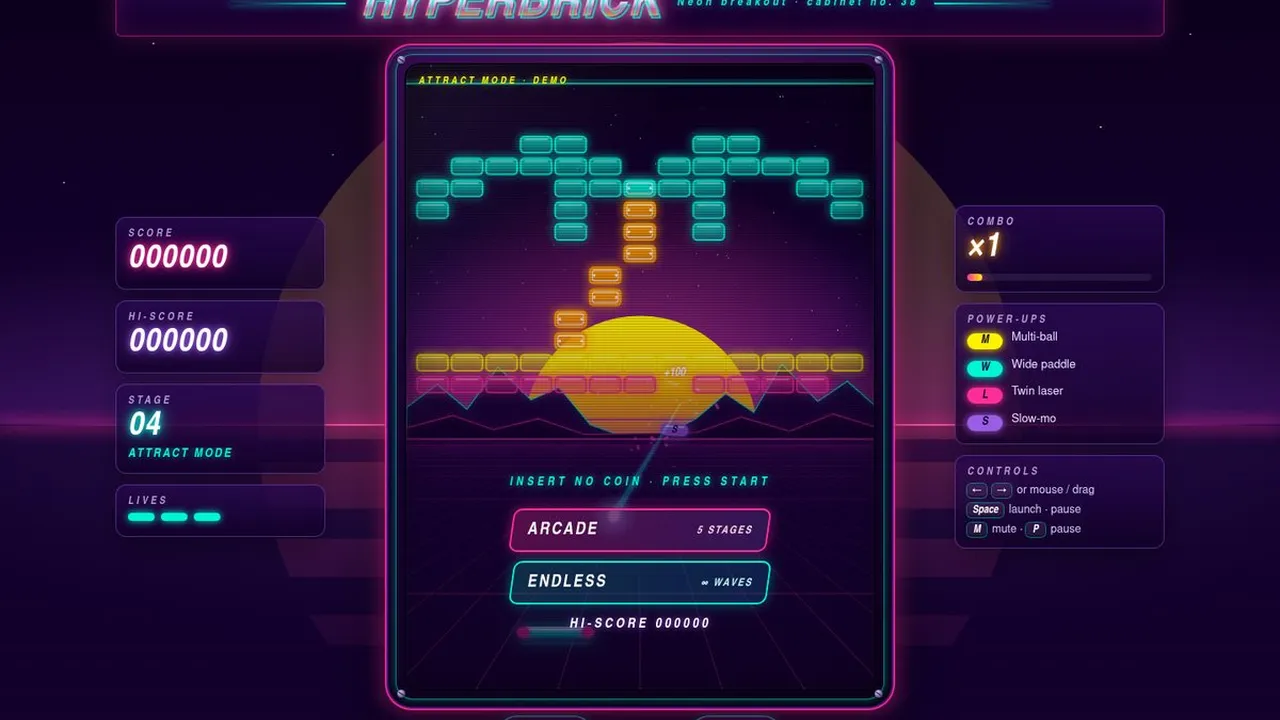
From MiaAI Lab’s collection of 100 single-file pages, each published with its exact prompt. This one gives exact hex colours and a long list of “juicy” feedback: particles, screen shake, combo pop-ups and sounds whose pitch rises with the combo.
Create "HYPERBRICK", a polished, playable Breakout-style arcade game with a synthwave aesthetic. A canvas playfield framed by an arcade bezel; background dark purple (#12002b) with a perspective grid horizon and a glowing sun. Bricks in glowing neon rows (#ff2e97, #ff9e00, #fff200, #00f5d4, #00bbf9, #9b5de5); a sleek neon capsule paddle; a ball that leaves a motion trail. Juicy feedback: bricks shatter into particles, screen shake on impact, a combo counter with pop text, paddle squash, flashes, and synthesized sound effects (Web Audio blips whose pitch rises with the combo; mute toggle). Power-ups drop from some bricks: multi-ball, wide paddle, laser, slow-mo. Five hand-designed levels (e.g. heart, invader, spiral) plus an endless mode. Controls: mouse/touch drag and arrow keys; Space to launch/pause. Screens: a title screen with an attract-mode demo, pause, and game over with a high score saved in localStorage. Typography: bold italic sans with neon glow for the HUD. Scales to phone screens with a portrait playfield.

SHARED REQUIREMENTS (apply to every page in this 100-page collection):
1. One standalone HTML5 file. All CSS inline in <style>, all JavaScript inline in <script>. No external resources of any kind: no CDN, no libraries, no web fonts, no external images/SVG/audio files, no network requests. All visuals come from CSS, inline SVG, Canvas and procedural code.
2. Valid HTML5: <!DOCTYPE html>, <html lang="en">, <meta charset="utf-8">, a viewport meta tag, a meaningful <title> and meta description, well-nested semantic markup, unique ids, labels/aria attributes for controls, <button type="button"> for actions.
3. Typography from local system font stacks only, always ending in a generic family; display lettering may be drawn with SVG or Canvas.
4. Responsive from 360px phones to large desktops with no horizontal page scroll; canvases match their container and devicePixelRatio (capped at 2) and re-layout on resize.
5. Works offline by opening the file directly (file://); no console errors; storage access guarded with try/catch.
6. Smooth motion via requestAnimationFrame and transform/opacity; animation pauses when the tab is hidden where it matters; honours prefers-reduced-motion with a calmer fallback.
7. Pointer events so mouse and touch both work; visible :focus-visible styles; keyboard support where it makes sense.
8. Any sound is synthesized with the Web Audio API, starts only after a user gesture, and has a visible mute/toggle.
9. Premium finish: a deliberate palette and spacing, polished micro-interactions, a beautiful first frame before any interaction, and original copy (no lorem ipsum). Factual content must be accurate; fictional brands, people and data are clearly fictional.
10. Quality bar: visually impressive, bookmark-worthy, showcase-grade, premium, full of delightful details, and clearly distinct from the other 99 pages in concept, layout, palette, typography and motion.
Scroll the box for the full 2,946-character prompt, or use Copy prompt.
Steal this: Ask for “juice” by name: screen shake, particles, squash and stretch, rising pitch. It is the difference between a demo and a game.
Open the listing: video, prompt and SKILL.md download → · Play the original ↗
Kitchen Rush: Overcooked-style SVG game
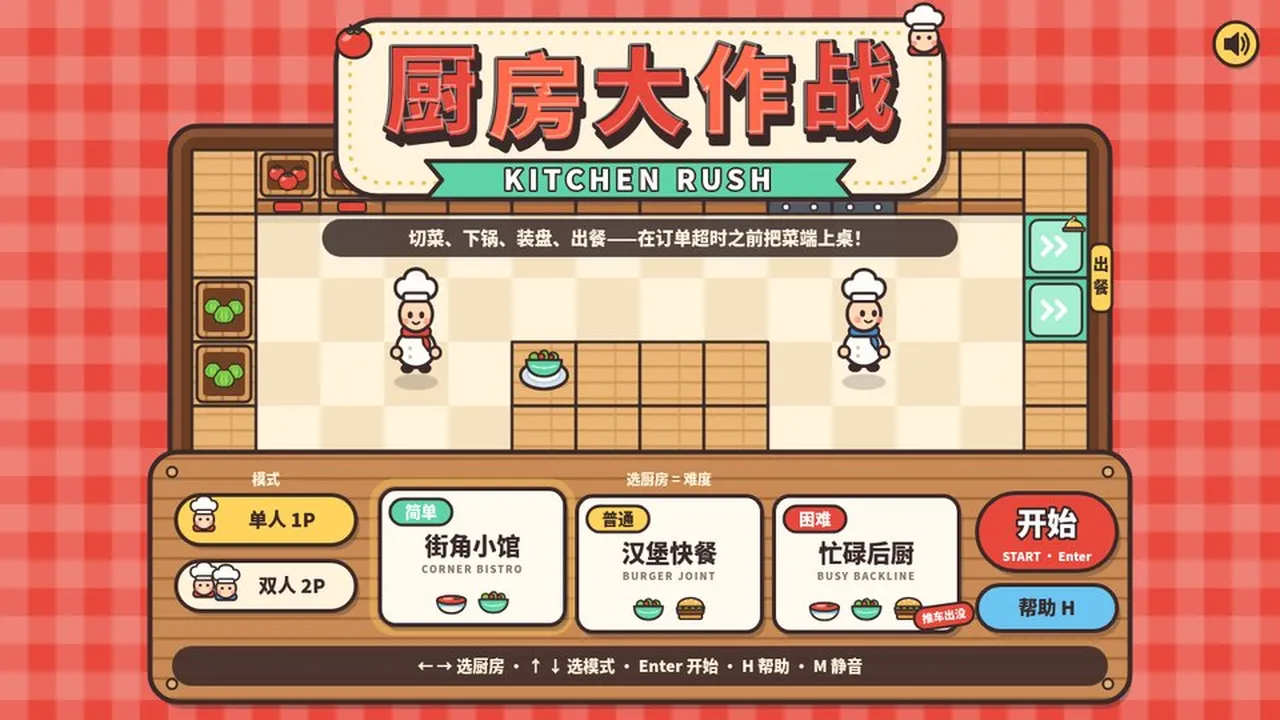
An Overcooked-style co-op cooking game delivered as a single SVG file, with art, logic and synthesised sound all inside it. The brief says “borrow the gameplay, not the characters, names or logos”, which is a good rule for any remake you want to share.
你负责独立完成一款浏览器小游戏《厨房大作战 KITCHEN RUSH》:俯视角合作烹饪,玩法借鉴《胡闹厨房》,角色、名字和美术全部原创。

【交付】
- 只交付一个自包含文件 kitchen-rush.svg,根元素为 <svg xmlns="http://www.w3.org/2000/svg" viewBox="0 0 1280 720" width="100%" height="100%" preserveAspectRatio="xMidYMid meet">,窗口缩放时 16:9 画面完整居中。
- 画面、界面、游戏逻辑(内联脚本)和音效全部写在这一个文件里,不引用任何外部图片、字体、脚本或网络资源,浏览器直接打开就能玩。文件必须是合法的 UTF-8 XML。
- 界面文字用中文,标题配英文副标题。音效和背景音乐用 Web Audio 实时合成,第一次按键或点击后开始发声,M 键静音。
- 只借鉴玩法,不使用原作的角色、名字或标志性素材。

【玩法】
- 每局营业 2 分 30 秒。订单小票依次出现在左上角,每张都有倒计时,要在超时前把菜做好送到出餐口。
- 做菜流程:从食材箱拿食材 → 在砧板上按住切菜键切好 → 下锅煮或下锅煎 → 装进盘子 → 送到出餐口。
- 三道菜:番茄汤(3 个切好的番茄放进锅里煮);蔬菜沙拉(切好的生菜 + 切好的番茄);汉堡(面包 + 煎好的肉饼 + 切好的生菜)。
- 出餐越快小费越多;订单超时扣分;汤和肉饼放太久会烧焦,只能倒进垃圾桶;端错菜会被退回。每个无效操作都要有简短提示,比如“番茄要先切”“锅满了”“要先装盘”。
- 单人模式同时拥有两位厨师,用 Tab 切换控制;双人模式两人在同一键盘上合作。
- 营业结束按得分给 1~3 星,并用 localStorage 记录最佳成绩。

【厨房(选厨房 = 选难度)】
- 简单「街角小馆」:番茄汤、蔬菜沙拉,订单少、节奏慢。
- 普通「汉堡快餐」:蔬菜沙拉、汉堡。
- 困难「忙碌后厨」:三道菜全上,同时最多 5 张订单,食物更快烧焦,还有推车在过道里来回穿行挡路。

【操作】
- 单人:WASD / 方向键 移动,空格 / J 拿起或放下,按住 K 切菜,Shift 冲刺,Tab 换厨师。
- 双人:1P 用 WASD 移动、F 拿放、G 切菜、左 Shift 冲刺;2P 用方向键移动、句号键拿放、斜杠键切菜、右 Shift 冲刺(也可以用小键盘 1 / 2 / 0)。
- P / Esc 暂停,H 帮助,M 静音。

【画面】
- 俯视卡通厨房,粗描边、暖色调:红白格子桌布作背景,木质台面,米色棋盘格地砖,灶台上放着锅。
- 两位原创厨师戴白色高帽,1P 系红围巾,2P 系蓝围巾,走路有弹跳感;当前控制的厨师脚下显示高亮圈和 1P / 2P 标签。
- HUD:左上角是订单小票(菜品图示 + 剩余时间条),顶部中间是闹钟造型的营业倒计时,右上角是金币得分和星级进度,左侧一栏列出当前模式的按键。
- 反馈:切菜进度条、锅里冒泡、快烧焦时闪烁警告、烧焦时震屏,出餐时飘出得分和小费。

【流程与界面】
- 标题页:左边选模式(单人 1P / 双人 2P),中间三张厨房卡片,右边“开始”和“帮助”按钮;方向键选择,Enter 开始,并显示最佳成绩。
- 帮助页“怎么玩”:做菜流程、三道菜配方、单人和双人两套按键,以及计分规则。
- 开局显示“准备…开工!”;暂停菜单有继续、重新开始、返回标题,暂停时锅里的菜也停住。
- 结算页“打烊啦!”:出餐数、小费、超时、烧焦、端错次数,以及得分和星级,可以再来一局。

【验收】
在无头 Chrome 里自动试玩:从标题页开局,实际做出至少一道菜并出餐。要求 0 个 JS 报错、0 个 XML 解析错误、帧率不低于 55 fps;在 1280×720 和 1920×1080 两种分辨率下截图,确认画面完整、文字不溢出。
Scroll the box for the full 1,652-character prompt, or use Copy prompt.
This prompt is in Chinese. Claude follows it as written; add “make all on-screen text English” if you need English.
Steal this: Add “borrow the gameplay only; make the characters, names and art original”. It keeps a remake shareable.
Open the listing: video, prompt and SKILL.md download → · Play the original ↗
6. Games made with and for kids
Some of the warmest results came from parents. Children are good at game ideas, and Opus 5.5 is good at turning a child’s idea into something playable the same evening.
Wildbrush: Zelda-style paintbrush adventure
Danny Limanseta built this with his sons: they described the game they wanted and he typed it in. The twist (a paintbrush as the weapon) and the permission to “use up to 6 agents” and “wow me” produced a 1.2M-view game you can play.
make a zelda-like game with paintbrush as a weapon and asked it to wow me and use up to 6 agents to build this.
Steal this: Let a child choose the twist. “A paintbrush as a weapon” is a better hook than most adult ideas.
Open the listing: video, prompt and SKILL.md download → · Play the original ↗
Storybook farm-animal game
A parent’s “lazy, half-assed” prompt for a four-year-old who loves farm animals. It is actually a good spec: an art style (Peter Rabbit), a menu, the controls, the interactions and the camera. The result is a 3D storybook farm where you can boop the other animals.
"Create a interactive farm animal game using the design/art style of "Peter Rabbit"
main menu = sounds on/off + animal picker (horse, pig, cow, cat, dog)
esc = pause: reset back to spawn/main menu/
wasd to move around
spacebar to jump and to interact with other animals when near
interactions are randomized upon proximity detection
interactions can be make sounds at the other animal (unique from their passive sounds) "boop them"
interactible with: water to drink, hay to eat, fruit to eat.
3rd person but as if the camera was slightly behind the animal and above it
ambience animals are birds, airplanes in the sky (randomly)
setting= farmland, barn, farming village with houses (cant enter houses)
Enough assets to capture attention, but not enough that it needs to be deemed production grade, this is just to capture 15 minutes out of my day with my daughter and have fun
react, svg, js, webgl, threejs, whatever is necessary to make it feel "good""
Steal this: Even a quick prompt should name an art style, the controls and the camera. Those three lines do most of the work.
7. How to write a game prompt for Opus 5.5
Across all 100 games, the same habits kept appearing. Use this as a checklist.
- Start with the fantasy, not the features. “A Fallout game in New York” beats a list of mechanics. Add features only where you care about them.
- Say the format. “One self-contained HTML file”, “Three.js”, “Godot 4” or “Unity” removes a lot of guesswork.
- Name the controls and the camera. “WASD to move, space to jump, third-person camera slightly behind and above.”
- Give an art direction with a contrast. “Painterly rather than photorealistic”, “Peter Rabbit style”, “1980s CRT green”.
- Remove the questions for long runs. “Make every decision yourself and don’t ask me anything.”
- Define done and make it test itself. “Play it from the title screen, take screenshots, fix the weakest parts.”
- Plan for two or three follow-ups. Bug fixes and polish are normal. One prompt gets you a strong first version.
Build a [genre] game: [one-sentence fantasy, e.g. "a Fallout game in New York"].
Format: one self-contained HTML file using Three.js from a CDN. No external assets: draw every texture and synthesise every sound in code.
Controls: [keys and camera].
Style: [art direction] rather than [what to avoid].
The first screen should be the actual game, not a landing page.
Make every decision yourself and don't ask me questions.
When it works, play it like a first-time player, list the five weakest parts and fix them.
8. More game prompts by genre
Every game here has a free listing with the creator’s video and the full prompt. A few more worth opening:
- Tron light cycles: “make a Tron game.” It also made the trailer.
- Snowy alleyway FPS: a one-paragraph shooter brief
- X-Wing squadron vs Star Destroyer: multiplayer space combat
- Pixel meteor dodger: a precise Canvas 2D spec
- Spear fishing island: a survival-show idea
- Hearthstone-style card game: strategy in one go
- LumenRift tower defense: a full game brief
- MALL ACTION: the longest brief in the collection
- Python learning game: a game that teaches coding
- Spot the cats in a Van Gogh: walk inside Starry Night
Or browse by genre on the Opus 5.5 game prompts page: adventure and RPG, shooters, racing, sandbox, strategy, simulators and arcade games.
FAQ
What is the best prompt to make a game with Claude Opus 5.5?
There is no single best prompt, but two shapes work reliably. A short, specific idea (“make me a Fallout game in New York”) gives Opus room to design the game itself. A full brief that names the engine, the controls, the art style and a definition of done gives you control. Most of the top games in this guide used one of those two shapes.
Can Claude Opus 5.5 really make a whole game from one prompt?
It can make a strong, playable first version. Several games here, such as the Mario Kart clone and the Call of Duty: Zombies clone, came from one prompt and a long unattended run. Most creators then sent a few follow-up messages to fix bugs and add polish, so plan for that.
Where should I paste a game prompt?
Claude Code is best, because it can write files, run a browser and test the game itself. For a single-file HTML game you can also use a normal Claude chat and open the result as an artifact.
Are these prompts free to use?
Yes. Every prompt is free to copy here and on its Omo listing, with no account. The games and videos belong to their creators, so credit them if you share what you make.
Do I need to know how to code?
No. Many creators in this guide say they cannot code. You do need to play what Claude builds and describe what is wrong in plain words, because that feedback is what turns a first version into a good game.
Will I get the same game if I use the same prompt?
No. Claude does not produce the same result twice, and some creators also used extra tools such as Blender, an image MCP or several sub-agents. Expect a game in the same spirit, not a copy.
Every video, game and prompt belongs to its creator and links to the original post. Prompts are quoted word for word from the creator’s own post, reply or repository. Model attribution is as stated by each creator; Omo did not re-run the prompts, so your result will differ. View counts were read on October 2, 2026.